What Is a Carbonless Paper Roll Used For?

A Carbonless Paper Roll is used to produce duplicate or triplicate records without inserting a separate carbon sheet. It contains treated paper layers that transfer writing or impact from the top copy to the sheets beneath. No loose carbon paper. The result is a set of copies created in one step, which can save time when staff handle frequent transactions.

These rolls are commonly used in compatible impact printers at checkout counters, dispatch desks, and service businesses. A shop might print a customer receipt and a retained copy; a kitchen may use order tickets to separate preparation and payment records. Delivery teams can also print proof-of-delivery details, such as an address, item count, and signature line. The narrow roll format fits printers designed for continuous paper, but it is not interchangeable with thermal paper. Printer compatibility matters.

Paper quality and handling affect how clearly each copy reads. Keep rolls dry, store them away from excessive heat, and check that the paper layers feed in the correct direction. A faint lower copy may come from worn printer pins, poor alignment, or unsuitable paper—not just a defective roll. It is tempting to assume all carbonless rolls perform alike; they do not. Confirm the printer model and required ply count before ordering, then test a sample with real handwriting or printed text. That small check can prevent smudged records and avoidable reprints.
What Is a Carbonless Paper Roll Used For?

## What Carbonless Paper Rolls Are and How CB, CFB, and CF Coatings Work

A carbonless paper roll makes duplicate or multi-copy records without a separate sheet of carbon paper. It is commonly used for receipts, order tickets, delivery notes, and service records. In a roll, the coated layers are arranged so pressure from a pen or impact printer transfers writing through the form. Layer order matters.

CB means “coated back.” Its back surface carries tiny capsules filled with dye precursor. When writing pressure breaks them, the released material reacts with a developer coating on the next sheet.

CF means “coated front”: it has the developer layer but no dye capsules. CFB means “coated front and back,” so it can receive an image on its front and pass the mark onward from its back.

A typical three-part set uses CB, CFB, and CF sheets. The chemistry is tiny, but the result is practical.

Storage and handling affect legibility. Excessive heat, dampness, or rubbing can damage the coatings before use; a faint copy may also reflect light writing pressure. AF&PA’s 2023 paper-recycling report estimated that 64.9% of U.S. paper and paperboard was recycled. That broad industry figure does not confirm that every carbonless roll is accepted locally, so check with the receiving recycler. Coating formulations and disposal guidance can vary. A useful detail to verify.

## How 2-Ply and 3-Ply Rolls Create Duplicate and Triplicate Records

What Is a Carbonless Paper Roll Used For?

Carbonless paper rolls create duplicate or triplicate records while a transaction is being written or printed. They are used for receipts, delivery notes, repair tickets, and service records. The roll format feeds continuous paper through compatible impact printers, which press characters onto layered sheets. No loose carbon sheet is needed. That matters at a busy counter.

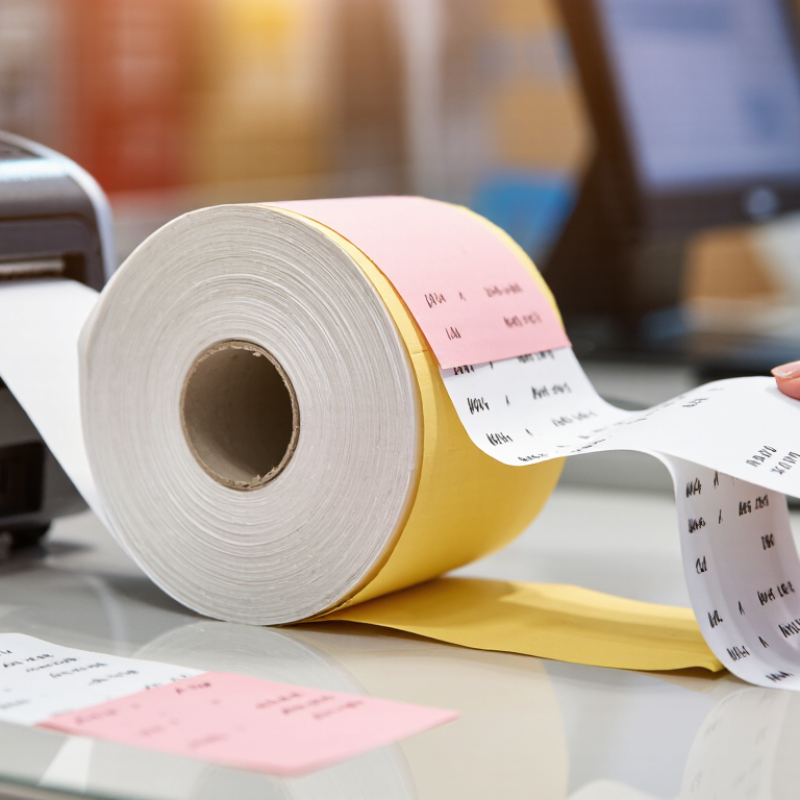
A 2-ply roll has a top sheet and a receiving sheet. Pressure transfers an image from the first layer to the second, leaving a customer copy and a business copy. A 3-ply roll adds a middle sheet, so one impact can create three records. The copies may be white, yellow, or another color for easy sorting. Results depend on correct paper loading and even print pressure. A faint third copy can happen if the printer is worn or the paper is misaligned. It is worth checking.

Tips: Confirm the roll’s ply count and size before ordering. Use an impact printer, not a standard thermal printer. Test a short section; check that every copy is legible and the perforations tear cleanly.

What Is a Carbonless Paper Roll Used For? — How 2-Ply and 3-Ply Rolls Create Duplicate and Triplicate Records

Roll Type Typical Layer Structure Records Produced How the Copies Are Made Common Uses Best Suited For
2-ply carbonless roll Top sheet: CB (coated back). Bottom sheet: CF (coated front). One original and one duplicate. Pressure from an impact printer or writing instrument transfers an image from the top sheet to the coated receiving sheet beneath it. Receipts, order records, service tickets, and customer copies. Transactions that need one copy for the customer and one copy for the business.
3-ply carbonless roll Top sheet: CB. Middle sheet: CFB (coated front and back). Bottom sheet: CF. One original and two duplicates. Pressure transfers the image through the coated middle sheet to create a record on each of the three layers. Delivery records, work orders, dispatch tickets, and multi-department transaction forms. Processes that require separate records for a customer, an office, and an operational team.

Note: Carbonless paper uses pressure-sensitive coatings rather than a separate carbon sheet. It is generally intended for impact printing or handwriting, not for direct thermal printing. White, yellow, and pink are common layer colors, but color order and availability can vary.

## Where Carbonless Rolls Are Used: POS Receipts, Invoices, and Delivery Notes

Carbonless paper rolls create duplicate or triplicate records without a separate sheet of carbon paper. They are commonly used in impact printers at checkout counters, service desks, and dispatch stations. A POS receipt can give the customer one copy while keeping another for the store. Invoices can travel with an order, and delivery notes can be signed at the doorstep. The writing pressure transfers information through coated layers. It is a practical fit where staff need a paper trail immediately.

The U.S. Census Bureau reported that e-commerce sales reached $1.119 trillion in 2023, or 15.4% of total retail sales. That figure does not measure carbonless paper use, but it shows the scale of orders that may require invoices and delivery records. For a busy dispatch desk, legible copies can help staff check item counts, capture signatures, and resolve missing-item questions. One wrinkle: extra copies are only useful when each sheet remains readable. Faint print, damp storage, or mismatched printer settings can make a record difficult to verify.

Tips: Check printer compatibility before ordering. Confirm roll width, ply count, and copy sequence. Test a short run, then inspect every copy under ordinary counter lighting. Keep spare rolls dry and away from heat. A small test can prevent a frustrating stack of unreadable forms.

## Typical 50–60 g/m² Grades and Roll Specs for Different Printers

Carbonless paper rolls are chosen by coating construction and printer feed, not by grammage alone. For many applications, 50–60 g/m² is a common range for each ply. A two-ply set pairs a CB top sheet with a CF copy sheet; a three-ply set adds a CFB middle sheet. Check the grade specification, since coating performance and opacity can vary at the same weight. Fit matters.

Impact printers are generally suitable because the print head pressure activates the transfer coating. A thermal receipt printer is different; its heat-sensitive coating will not create carbonless copies. For dot-matrix or line printers, confirm roll width, core diameter, maximum outer diameter, winding direction, ply count, and perforation spacing. A 50 g/m² ply may feed more easily, while 60 g/m² stock can feel firmer. Heavier paper is not always better for multi-ply forms.

Measure the paper path and guide clearance before ordering, especially for narrow receipt-style rolls. Wider invoice rolls need stable tracking, and joined plies can shift during feeding. Request a sample and test copy legibility, edge curl, and alignment across the roll. Test first. Core size is easy to overlook, even on a careful specification sheet.

## How to Match Roll Ply, Width, and Coating to the Printing Application

Carbonless paper rolls create duplicate or triplicate records without an ink ribbon or separate copy sheet. They are common in receipt printers, service counters, delivery paperwork, and compact point-of-sale systems. Choosing the right roll starts with the form’s purpose. A customer receipt may need only two copies, while an order record may require three. Each added ply increases thickness and can make feeding less reliable in a printer not designed for it.

Match the roll width to the printer’s specified paper path, not just the old roll’s appearance. A roll that is too wide may rub against the guides; one that is too narrow can shift during printing. Check the core diameter and roll diameter too, since both affect fit and capacity. Coating matters as well: carbonless sets rely on reactive coatings that transfer writing pressure between sheets. Confirm the ply sequence and printable face with the supplier, then test a sample for legible copies, clean feeding, and smudge resistance. Small differences show up quickly.

Tips: Measure the paper path and core before ordering. Test a sample first. If copies look faint, check the coating orientation and print pressure before changing the paper grade. It is easy to blame the roll, though printer wear can also be part of the problem.

Click to access the login or register cheese
Scroll to Top

Request a Quote

Call 815-281-5297 now to speak directly with an Algus expert or fill out the form below.